July 2018 – Natural Light, Layer Masks, Blend Mode, Backups, Photo Manipulation
There’s a photography joke that’s been around for a long time about photographers that say, “I only use natural light for my photography”. The real interpretation of that statement is “I really have absolutely no idea how to use my flash”. Joking aside, there are a lot of benefits in learning to use natural light in your photographs. Here’s an article by Tim Kainu that was published on the Picture Correct web site titled “Natural Light Photography Tips”.
https://www.picturecorrect.com/tips/natural-light-photography-tips/
Anyone who works with photoshop knows that one of the major strengths of the program is the ability to use Layer masks. On the Photoshop Café website, Colin Smith posted this tutorial titled “The Ultimate Guide on How to Use Photoshop Layer Masks”. I’ve also included a link to Collin’s free eBook on Photoshop Blend Modes. Thanks to Mickey Rountree for sending me this link.
https://photoshopcafe.com/use-layer-masks-photoshop-7-layer-masking-tips/
https://photoshopcafe.com/blendmodeebook
Now that you’ve got some exposure on Photoshop Blend Modes, let’s hammer it in with another tutorial from my favorite French Photographer, Serge Ramelli. Serge calls this one “Photoshop Blending Modes for Photographers”.
https://www.youtube.com/watch?v=-7Ci9PoO_Zw
I owe this next article to Richard Smith who sent me the link. The importance of backing up our photos is something we’re all aware of but somehow always gets put on the back burner. I finally solved my avoidance of backing up’s by subscribing to an online backup site. Now it just happens automagically. But if you don’t want to do that. here’s an article from the New Your Times by Terry Sullivan titled “A Beginner’s Guide to Backing Up Photos”.
This next one is a little fun exercise in photo manipulation. The tutorial will take you from this

to this
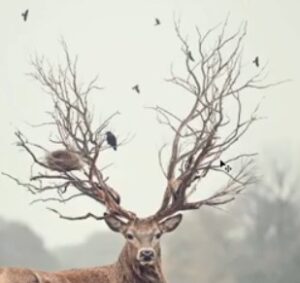
This tutorial is put together by the PSD Box. There website is http://www.psdbox.com. The tutorial is over on YouTube and titled “Deer Creative Manipulation for Beginners”. Fortunately, the tutorial is much more creative than the title they came up with. The even have a link where you can download the image files they used in the tutorial for free. Here’s the link to the tutorial: