December 2017 – Black and White, Sharpening, Sunset Silhouette
We’ll spend a little time on Black & White photography this month in honor of my friend Rosemary Williams who’s just been notified that one of here entries into the Black & White Single Image Contest 2018 has won an award and will be published in Black & White magazine. The first tutorial is from Blake Rudis of f.64 Academy and is titled Three Techniques for better Black and White Images. The video is a little less than 20 minutes long and can be found here:
Another recent look at Black and What was recently published on the Picture Correct by Andrew Goodall and titled Black & White Photography Techniques. Here’s the link:
https://www.picturecorrect.com/tips/black-and-white-photography-light/
Now that you’ve created all those stunning B&W images you’ll need to sharpen them. If you shoot in Raw, every single image you take must have some sharpening. There’s at least a half of dozen plugins on the market that claim to be the best sharpening tool on the market but who wants to spend money on something that you can do in Photoshop. This tutorial is a couple of years old, but it just popped up on my radar. It’s from Blake Rudis and titled 6 Ways to Sharpen in Photoshop Without Plugins. At the end he gives you a button to download an action set that will let you do a one click sharpen just like a plugin.
http://f64academy.com/6-ways-to-sharpen-without-using-plugins/
Shooting sunsets can be rewarding and fun but sometimes people won’t get out of your pictures. One way to handle that is to turn them into silhouettes. Actually, Silhouette photography is fun. Here’s an article by Danny Eitreim that explains how to do it, titled of all things Sunset Silhouette Photography. It’s on the Picture Correct web site.
https://www.picturecorrect.com/tips/sunset-silhouette-photography/
Now for all of you that feel that Black & White photography is unrealistic because all the color has been sucked out of it here’s a tutorial by our friend Blake Rudis titled How to make the most Natural Color Correction in Photoshop.
http://f64academy.com/inverted-color-correction/?mc_cid=cb47a0b2d0&mc_eid=b757bed750

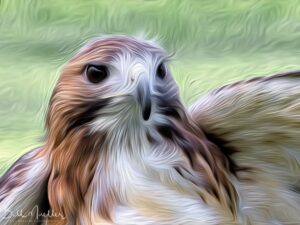 Let’s start out this month with something for those shooters who like the oil paint effects on a photograph. I never really liked the oil paint out of Photoshop, I thought the Topaz Impression filter did a much better job. Blake Rudis did a neat tutorial on using the Photoshop filter but he broke down the image into Shadows, Midtones and Highlights and applied different paint strokes to each section. His video runs about 15 minutes and it’s pretty detailed. I found myself following along on one of my images and had to stoop several times to go back and repeat sections. It’s titled How to Use Oil Paint in Photoshop The Right Way. Here’s the link and my attempt at following his technique.